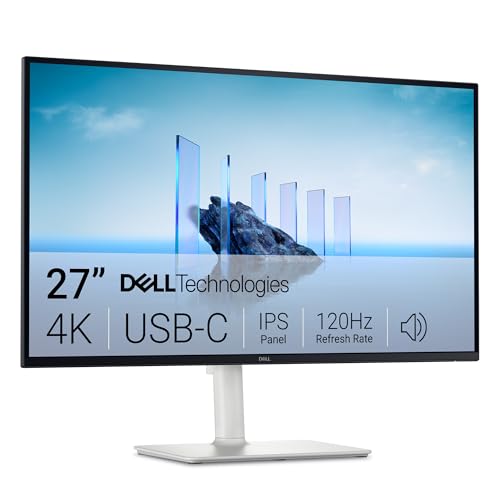
If you want one monitor that does a bit of everything, the Dell 27 Plus 4K USB-C (model S2725QC) sits at the top of our lineup. It pairs a sharp 27-inch 4K IPS screen with a refresh rate of up to 120 Hz, a single USB-C cable that can also charge a laptop, and speakers built into the panel. We do not test products ourselves, so everything below comes from Dell’s published pages and from the way those specs fit real home-office, student and light gaming setups. Where a page did not state something, we say so.
What This Monitor Is
The S2725QC is part of Dell’s mainstream “Plus” line, not the premium UltraSharp line. In Dell’s lineup, that means a strong feature set aimed at everyday users rather than color professionals. The listing on Amazon describes a 27-inch, 3840 x 2160 IPS display with a 120 Hz maximum refresh rate, 99% sRGB coverage, FreeSync Premium and a 4 ms fast response mode. The monitor comes in Ash White, which is a light off-white finish that suits bright desks and shared rooms.
It is easy to confuse this model with its siblings. The S2725QS looks similar but does not have the USB-C connection, and the S2725HS in our lineup is a 1080p model. Make sure the listing says S2725QC and USB-C before you order.
Display: Sharp 4K and Smooth Motion
Dell lists a 27-inch IPS panel at 3840 x 2160, about 163 pixels per inch, with 178-degree viewing angles. At that density, text looks crisp at typical desk distance and photos show fine detail. On Windows, most people run this size at 150% scaling, which gives you roughly the workspace of a 1440p screen with much sharper text. On a Mac, macOS handles 4K at 27 inches cleanly, and the Mac default scaling looks good without extra tweaking.
Dell lists 350 cd/m2 brightness, a 1,500:1 contrast ratio, 1.07 billion colors and 99% sRGB coverage. Those are solid figures for office work, streaming and everyday photo browsing. They also tell you what this monitor is not. There is no DisplayHDR certification on the page we read and no wide-gamut rating, so HDR video will not look dramatically different from standard video. If color accuracy for print or professional video is part of your job, our UltraSharp U2725QE profile covers a monitor with a wider gamut and a higher brightness rating.
The 120 Hz refresh rate is the other highlight. Moving a window or scrolling through a long page feels noticeably smoother than on a 60 Hz screen. AMD FreeSync Premium is listed for variable refresh rate, which helps reduce tearing in games on a compatible graphics card. Dell also lists a 4 ms gray-to-gray fast response mode, with 5 ms and 8 ms options. Because refresh rate depends on the input, the connection you use and the device sending the signal decide whether you actually get 120 Hz at 4K, so read Dell’s manual for per-input figures if you plan to game.
Dell also lists ComfortView Plus (a hardware low-blue-light mode) and a TÜV 4-star eye comfort rating. These are features Dell advertises; we make no claims about their effect on your eyes.
Ports and One-Cable Setup
The port list is the reason this monitor sits at number one for laptop owners. According to Dell, you get:
- One USB-C 5Gbps upstream port with DisplayPort 1.4 Alt Mode and up to 65W of power delivery
- Two HDMI 2.1 ports
- One USB-C 5Gbps downstream port, up to 15W
- Two USB-A 5Gbps downstream ports, one with Battery Charging 1.2
Plug a laptop into the upstream USB-C port and a single cable carries the picture, charges the laptop and connects anything on the monitor’s USB ports, such as a keyboard, mouse or webcam. That declutters a desk and makes it easy to unplug and go. It is the same convenience people pay extra for in docks.
Two details matter here. First, the 65W figure is the maximum. Thin-and-light laptops with chargers of 65W or less will do fine. Larger laptops, such as performance MacBook Pro models or gaming notebooks with 100W or higher chargers, may charge slowly or keep draining under heavy load. Check the wattage printed on your laptop’s charger. Second, your laptop’s USB-C port must support video output (DisplayPort Alt Mode or Thunderbolt). Some budget laptops have data-only USB-C ports, which will not work for this. Your laptop maker’s spec page will say.
Dell’s port list shows no standalone DisplayPort input. That is a difference from the monitor listing’s wording on some retailer pages, so we go with Dell’s page. A desktop PC can connect over HDMI, or over USB-C if the graphics card has one.
Stand, Speakers and Mounting
Dell lists a height-adjustable stand with up to about 5.1 inches (130 mm) of travel, tilt from -5 to 21 degrees, swivel of 30 degrees each way and a 90-degree pivot in either direction. That is a fuller range than many monitors at this level and means you can turn it into portrait mode for coding or reading long documents. The monitor weighs about 14.8 lb (6.71 kg) with the stand, according to Dell. Dell also lists VESA 100 x 100 mm compatibility once you remove the stand, so a monitor arm is an option.
Two 5W speakers are built in. They are fine for video calls and the occasional clip, but at 5W each they will not replace desk speakers or headphones for music. There is no webcam in the monitor, so you will still use your laptop’s camera or a separate one.
Who Should Buy the Dell S2725QC
- Laptop users who want one cable. Charging, video and USB devices on one USB-C line.
- Home-office workers and students who want sharp text and room for several windows.
- Mac owners with a thin-and-light MacBook. Dell lists macOS compatibility, and the 4K panel scales cleanly on macOS. Our BenQ MA270U profile covers a model built around the Mac.
- Casual gamers who want 120 Hz and FreeSync Premium without a gaming-brand price. Console players should read the HDMI details in Dell’s manual first.
- Anyone who wants a long warranty. Dell lists a 3-year limited hardware warranty with Advanced Exchange.
Who Should Look Elsewhere
- Photographers and video editors who need wide gamut, high brightness or calibration data. Dell lists 99% sRGB and 350 cd/m2 on this model.
- People whose laptop needs more than 65W to charge properly.
- Competitive esports players. A 1440p panel at a higher refresh rate, like the Samsung Odyssey G50D, is easier to drive on a mid-range graphics card.
- Desktop users who need a DisplayPort input. Dell’s port list does not show one.
- Buyers who want a built-in KVM switch or Ethernet. Those are on the UltraSharp, not here.
What to Check on the Amazon Listing
- Model number. The title should read S2725QC. The S2725QS does not have USB-C.
- Seller and warranty. Check who sells and ships the monitor. Dell’s warranty terms apply best when the seller is Dell or Amazon itself. Third-party sellers can differ.
- Color. Dell lists Ash White. If you want a dark monitor, check the listing photos.
- Return window. Large monitors can arrive with dead pixels or shipping damage. Look at Amazon’s return terms before you open it.
- Customer reviews. Read what buyers say about the stand and USB-C behavior with their specific laptop model. Third-party reports on a stand wobble are worth a glance if you type hard on your desk.
Our Take
The S2725QC is not the flashiest monitor in our lineup, but it solves the most common problem well: a laptop on a desk that needs a bigger, sharper screen and fewer cables. The 4K IPS panel, the 120 Hz refresh rate, the 65W USB-C connection, the two HDMI 2.1 ports and the full stand adjustments add up to a lot of value for a mid-range monitor. Its limits are clear: moderate brightness, sRGB-only color, no DisplayPort input and 65W charging. If those fit your needs, this is the one we would start with. See how it ranks in our best monitors of 2026 comparison.
See price on Amazon
Sources