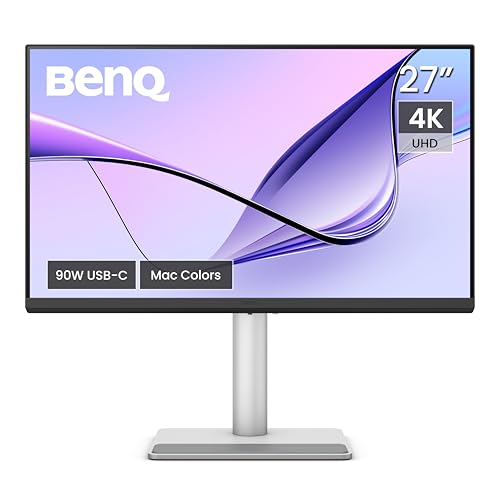
The BenQ MA270U is a 27-inch 4K monitor designed around the Mac. BenQ markets it for MacBook owners, with a USB-C port that can charge a laptop, color tuned for Apple’s displays and software that lets a MacBook keyboard control the monitor’s brightness and volume. We rank it third in our lineup, behind two Dell models that are easier to recommend for most people. For MacBook owners, though, it may be the most thoughtful of the three. We do not test monitors ourselves, so everything here comes from BenQ’s published pages. Where a page did not state something, we say so.
What This Monitor Is
The MA270U belongs to BenQ’s MA series, the Mac-focused range. It is a matte-finish monitor, and BenQ calls the coating Nano Matte, with TÜV Reflection Free certification. A glossy sibling called the MA270UP exists, and a larger MA320U also sits in the line. This profile covers the MA270U only. BenQ’s EU specification page lists a 27-inch IPS panel at 3840 x 2160, 163 pixels per inch, a 60 Hz refresh rate, 5 ms gray-to-gray response and a native 1,200:1 contrast ratio.
Display: P3 Color and Matte Finish
BenQ lists 99% sRGB and 95% P3 coverage, with HDR10 and VESA DisplayHDR 400 support. Typical brightness is listed at 400 cd/m2, with the same peak figure for HDR. That brightness is higher than the 350 cd/m2 listed for the mainstream Dell in our lineup, and the P3 coverage is closer to what Apple’s own screens show.
BenQ also describes Mac Color Match, a calibration approach that tunes the monitor so colors resemble those on a MacBook display. BenQ’s page compares the MA270U against a 13-inch MacBook Pro (M2, 2022) on gamut and color difference, and notes that results are not identical for every MA model. Treat it as a way to get a similar look side by side with your laptop, not as a guarantee of an exact match.
The matte finish is a practical choice. In a bright room or near a window, a matte coating cuts reflections more than a glossy panel does. The trade-off is that matte coatings can slightly soften the sparkle of very fine details. For office work and everyday viewing, most people prefer matte.
At 60 Hz, motion is fine for documents, video and photos. It will feel less smooth than a 120 Hz monitor when you scroll and drag windows, and it is not intended for gaming at high frame rates.
Ports: One Cable to Your MacBook
BenQ’s specifications list:
- USB-C upstream: 90W power delivery with DisplayPort Alt Mode and data
- USB-C downstream: one 5Gbps port with 15W charging
- USB-A downstream: two 5Gbps ports with 7.5W charging
- HDMI: two HDMI 2.0 ports
- Headphone jack: yes
BenQ also lists Always-on Power Charging, which charges devices through the USB-C and USB-A ports even when the monitor is asleep or off.
At 90W, the main USB-C port can cover laptops whose chargers are rated at or below that level. Apple’s charger wattages vary by MacBook model and some are higher, so check the rating printed on yours. Connect the laptop with one USB-C cable and the monitor carries video and power, and its USB ports then become a hub for a keyboard, a mouse or a drive.
Be aware of the HDMI 2.0 limit. HDMI 2.0 can carry 4K at 60 Hz, which matches this monitor, but it will not carry 4K at higher refresh rates. That is not an issue for a 60 Hz panel.
Mac Features: What BenQ Says
Most monitors cannot change brightness or volume from a MacBook’s keyboard. BenQ says you can set that up with its Display Pilot 2 software: install it, enable iKeyboard Control and choose the monitor as the audio output in macOS. BenQ also lists a Sync Control feature, so that the brightness and volume keys on the MacBook adjust both displays together. Display Pilot 2 also provides Mac-style settings and quick access to color modes.
On macOS, a 27-inch 4K display works well at the default scaling. In System Settings under Displays, you can choose a “looks like” resolution. Most people pick a setting that gives a text size similar to their laptop. If a specific scaled mode matters to you, check Apple’s support pages for your Mac.
Audio, Stand and Mounting
BenQ lists two built-in 3W speakers and audio modes named Standard, Dialogue, Music, Cinema and Game. Those speakers are modest and are fine for calls. For music, use headphones or separate speakers.
The stand, according to BenQ’s EU specification page, offers about 4.5 inches (115 mm) of height adjustment, tilt from -5 to 20 degrees, swivel of 15 degrees each way and a 90-degree pivot. The monitor supports VESA 100 x 100 mm mounting. It weighs about 18.1 lb (8.2 kg) with the stand and 11.3 lb (5.14 kg) without it. BenQ’s Energy figures list 40 W in normal use.
Compared with the Dell S2725QC, the BenQ has a smaller height and swivel range and half the refresh rate, but adds a higher USB-C wattage, a matte finish and the Mac software. Compared with the Dell UltraSharp U2725QE, it lacks Thunderbolt, Ethernet and KVM, and it costs less.
Who Should Buy the BenQ MA270U
- MacBook owners who want a monitor that charges the laptop, matches colors closely and adds keyboard control for brightness.
- Writers, coders and office workers who want sharp text in a matte finish.
- Photographers on a budget who want near-P3 coverage without paying for a professional monitor. For critical work, calibrate.
- Anyone working near windows, where reflections on a glossy panel are a nuisance.
Who Should Look Elsewhere
- Gamers. 60 Hz is the ceiling. See the Samsung Odyssey G50D profile for a mid-range 1440p gaming option.
- Windows desktop users who need DisplayPort. BenQ lists none.
- People who want built-in Ethernet or a KVM switch. Those belong to the UltraSharp.
- Buyers who want strong speakers. The 3W speakers are basic.
What to Check on the Amazon Listing
- Model number. The title should say MA270U, not MA270UP (glossy) or MA320U (larger).
- Seller and warranty. BenQ’s pages we read do not state warranty terms. Check the seller and the warranty offered on the listing.
- Your Mac’s ports. USB-C with DisplayPort output is needed for the one-cable setup. Apple’s tech specs list the number of external displays per chip.
- Charger wattage. If your laptop’s charger is above 90W, charging may be slower under load.
- Customer reviews. Look for notes on Display Pilot 2 behavior with your macOS version.
Our Take
The MA270U is a focused monitor. It does not chase specs beyond what a MacBook user needs: sharp 4K, near-P3 color, a matte screen, 90W charging and software that makes the monitor feel like part of the Mac. Its limits are plain: 60 Hz, modest speakers and no DisplayPort connector. For MacBook owners who value those Mac touches, it is a strong third on our list. See how it ranks in our best monitors of 2026 comparison.
See price on Amazon
Sources