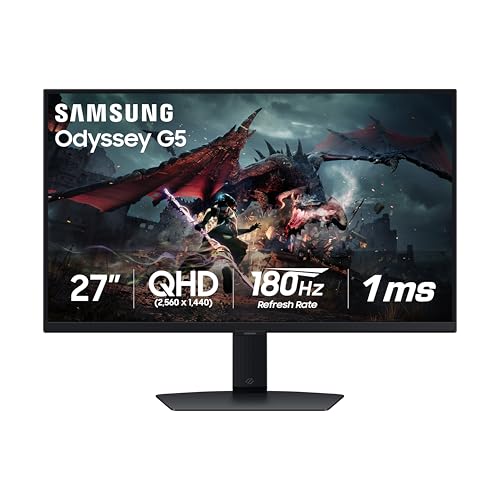
The Samsung Odyssey G5 G50D is the monitor we picked for readers who want a fast 1440p gaming screen without paying for OLED. It is a 27-inch Fast IPS panel with a 180 Hz refresh rate, a 1 ms response time and support for both G-Sync and FreeSync. It is a mid-range 1440p gaming monitor, and it is the most affordable gaming pick in our lineup. We do not test monitors ourselves, so the details here come from Samsung’s published pages. Where a page did not state something, we say so.
Which G50D Is This?
Samsung sells several G50-series monitors. The listing we link to is the 27-inch LS27DG500ENXZA, a 2024 model. It is not the G50F, the G51F, the curved G55 series or an OLED model from the Odyssey G5 family. If you see a different model number on a listing, the numbers in this profile may not apply. Samsung’s own US store page for the 27-inch model showed it as out of stock when we looked, so check the seller and the model number on the Amazon listing before you order.
Display: 1440p at 180 Hz
Samsung’s pages list a 27-inch IPS panel at 2560 x 1440 (QHD), with a maximum refresh rate of 180 Hz and a 1 ms gray-to-gray response time. On a 27-inch screen, 1440p is a well-known balance for gaming: it is noticeably sharper than 1080p and much easier for a mid-range graphics card to drive than 4K at high frame rates.
According to Samsung’s Canadian spec table, brightness is 350 cd/m2 typical (280 cd/m2 minimum), static contrast is 1,000:1 and color coverage is 99% sRGB. Samsung also lists VESA DisplayHDR 400. DisplayHDR 400 is the entry tier, and on an IPS panel with a typical contrast ratio it gives a small lift to highlights rather than the deep contrast of a premium HDR display. Think of it as a supported feature, not a headline reason to buy.
For variable refresh rate, Samsung lists both AMD FreeSync and G-Sync Compatible. That means it works with variable refresh on modern AMD and NVIDIA graphics cards, which smooths out frame-rate dips and reduces tearing.
Ports and the HDMI Question
Samsung’s spec table lists two video inputs:
- DisplayPort: one port, version 1.2
- HDMI: one port, version 2
There is no HDMI 2.1 port and no USB hub on the table we read. That matters in two ways.
For PC gamers, DisplayPort is the connection to use for the highest refresh rate. A DisplayPort cable is also listed as included on Samsung’s Canadian French page. Check Samsung’s manual for exact refresh rates over each input before you plan around 180 Hz on HDMI.
For console players, the HDMI port is HDMI 2.0-class. Running 4K at 120 Hz over HDMI generally calls for HDMI 2.1, and this monitor suits PC players more than PS5 or Xbox Series X owners who want that mode. Sony’s and Microsoft’s support pages list which output modes each console offers. If a console is your main device, the LG UltraGear 27GX790A in our lineup has HDMI 2.1 ports.
Stand and Mounting
Samsung lists a height-adjustable stand with tilt of about -2 to 25 degrees, swivel of 30 degrees each way and pivot of roughly 92 degrees each way. The height figure is shown as 120 (plus or minus 5) with no unit on the page; it is most likely millimeters, but we cannot confirm that from the table. The monitor supports VESA 100 x 100 mm mounting. It weighs about 14.1 lb (6.4 kg) with the stand and about 7.5 lb (3.4 kg) without it, and measures about 24.1 x 21.7 x 10.4 inches (613 x 552 x 263.5 mm) with the stand. Pivot support is useful for coders and writers who like a vertical screen, though a vertical gaming monitor is a less common choice.
Samsung’s table mentions a headphone jack only and lists no speakers. Plan on a headset or desk speakers.
Warranty
Samsung’s US store page, in a reply to a customer, says the monitor carries a 1-year limited manufacturer’s warranty when it is bought new from an authorized dealer. That is shorter than the 3-year terms Dell lists for the monitors in our lineup. If you buy through a third-party seller on Amazon, check whether the Samsung warranty applies.
How It Compares
Compared with the Dell S2725QC, the Samsung drops to 1440p and gives up USB-C and speakers, but it raises the refresh rate to 180 Hz and brings a 1 ms response time and G-Sync support. If you are also doing office work on a laptop, the Dell is the more flexible monitor. If you mostly play PC games, the Samsung is a better match.
Compared with the premium LG UltraGear OLED, the Samsung is slower (180 Hz against 480 Hz), has a much lower peak contrast and uses a conventional IPS panel. But the LG sits in a higher price tier, and many players will not be able to use a 480 Hz refresh rate with their graphics card anyway.
Who Should Buy the Samsung Odyssey G50D
- PC gamers who want a 1440p, high-refresh monitor without OLED money.
- Players with a mid-range graphics card, where 1440p at 120 to 180 frames per second is more achievable than 4K.
- Players on either NVIDIA or AMD cards, since the monitor supports variable refresh rate on both.
- Shoppers who also want a pivot stand for a vertical second screen.
Who Should Look Elsewhere
- PS5 and Xbox Series X owners who want 4K at 120 Hz. Samsung lists HDMI 2, not 2.1.
- Laptop users who want one-cable USB-C charging. There is no USB-C on Samsung’s table.
- People who want built-in speakers. None are listed.
- Photographers and video editors. The panel is sRGB-class and not a calibrated creative monitor.
- Anyone who wants a long warranty. One year is the listed term.
What to Check on the Amazon Listing
- Model number. The title should say LS27DG500ENXZA. The G50F, G51F, G55 and OLED G5 are different monitors.
- Stock and seller. Samsung’s own store listed it as out of stock. Check who sells and ships it, and whether the seller is Samsung or Amazon.
- Warranty. Confirm that Samsung’s 1-year warranty applies to that unit.
- Cable. Samsung’s Canadian French page lists a DisplayPort cable as included. Confirm what is in the box on your listing.
- Customer reviews. Look for comments from players with your graphics card and any notes on backlight bleed, which can vary between units on IPS panels.
Our Take
The G50D is a mid-range gaming monitor that focuses on the basics: a 1440p IPS panel, 180 Hz, 1 ms response and support for both major variable-refresh standards. It does not try to be a laptop dock or a console showcase. If you play on a PC and want a fast, sharp screen at a lower price tier than OLED, it is the most affordable gaming pick we recommend. If you play on a console, or want USB-C and speakers, one of the other monitors in this lineup is a better fit. See how it ranks in our best monitors of 2026 comparison.
See price on Amazon
Sources