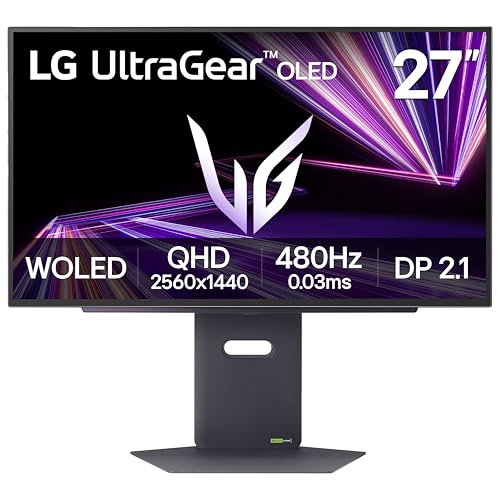
The LG UltraGear OLED 27GX790A-B is aimed at one kind of buyer: a competitive PC gamer who wants the fastest 1440p screen that LG makes. It pairs a 27-inch WOLED panel with a 480 Hz refresh rate and a 0.03 ms response time. It sits at the premium end of our lineup, at number five, because it is the most specialized monitor in it. We do not test monitors ourselves, so the details come from LG’s published pages. Where a page did not state something, we say so.
Which LG Is This?
LG sells several UltraGear OLED monitors, and the names are close. The 27GX790A-B we link to is the 27-inch QHD model with a 480 Hz refresh rate. It is not the 27GS95QE, which is a 240 Hz model, and it is not the 27GX704A. LG’s announcement of this monitor is dated November 18, 2024, which makes it a late-2024 model. Check the model number on the Amazon listing before you order.
Display: WOLED at 480 Hz
LG lists a WOLED panel (white OLED with color filters) at 2560 x 1440 with a 480 Hz maximum refresh rate and a 0.03 ms gray-to-gray response time. LG’s Canadian page lists the diagonal at 26.5 inches, marketed as 27 inches. OLED pixels switch themselves on and off, so each pixel can go fully dark. LG lists a 1,500,000:1 typical contrast ratio, DCI-P3 coverage of 98.5%, 178-degree viewing angles and HDR10 with VESA DisplayHDR True Black 400 certification. LG also lists the highest VESA ClearMR tier for motion clarity, and an anti-glare, low-reflection coating.
The brightness number deserves attention. LG’s Canadian page lists 275 cd/m2 typical. That is lower than the 350 to 450 cd/m2 on the IPS monitors in our lineup, which is typical of OLED monitors at full-screen brightness. It means the screen looks best in a room where light is controlled. In a bright room with sun on the desk, an IPS panel can look brighter. LG does not state a peak brightness figure on the pages we read, so we do not quote one.
For adaptive sync, LG lists G-Sync Compatible, AMD FreeSync Premium Pro and VESA AdaptiveSync, so it works with variable refresh rate on both NVIDIA and AMD graphics cards.
Ports
LG’s Canadian specification page lists:
- DisplayPort: one port, version 2.1
- HDMI: two ports (LG’s launch announcement describes them as HDMI 2.1)
- USB: one upstream and two downstream USB 3.0 ports
- Headphones: 4-pole headphone out
LG says DisplayPort 2.1 offers 67% more bandwidth than DisplayPort 1.4. That headroom is what allows a 480 Hz QHD signal. To use it, your graphics card needs to support the connection, and the cable must be rated for it. If your card has only DisplayPort 1.4 or HDMI 2.1, check LG’s manual to see which refresh rate each connection supports. At the time of writing, we do not have a source that states per-input refresh rates for this model, so we do not quote any.
The two HDMI ports are useful for a console and a second PC. Consoles output specific modes that Sony and Microsoft document on their own support pages, so read those for what a PS5 or Xbox Series X will send to a 1440p OLED. For a lower-cost 1440p gaming option with weaker HDMI, see the Samsung Odyssey G50D profile.
LG lists no built-in speakers on the pages we read.
Stand and Mounting
LG lists an adjustable stand with tilt from -5 to 15 degrees, swivel of 30 degrees each way, pivot and about 4.3 inches (110 mm) of height adjustment. LG’s Canadian page adds a OneClick stand and VESA 100 x 100 mm wall mounting. The monitor weighs about 20.5 lb (9.3 kg) with the stand and about 11.2 lb (5.1 kg) without it, and measures about 23.8 x 18.5 x 9.8 inches (605.2 x 469.3 x 249.1 mm) with the stand lowered.
OLED Burn-In and Warranty
OLED screens are made of organic materials that can wear unevenly. Burn-in is permanent retention of a static image, and it is the main long-term concern with any OLED monitor, especially when static items stay on screen for many hours a day: taskbars, docks, spreadsheet gridlines and HUD elements in games.
Practical habits help: use dark mode, set the taskbar to auto-hide, use a changing wallpaper and a screen saver, and let the monitor’s built-in care cycles run when it goes to standby. We do not have a source for exactly what this model does in standby, so check LG’s manual.
The warranty is a separate question. LG’s specification pages we opened do not state terms or burn-in coverage. Press coverage we found has described LG’s US policy on burn-in for UltraGear OLED monitors, but the reports differ in detail. Read LG’s current US warranty document for this exact model, and check that the seller on the Amazon listing is LG or Amazon so that LG’s terms apply.
How It Compares
Compared with the Samsung G50D, the LG has the same 1440p resolution, but it is a much faster panel with deep blacks. The Samsung is IPS, at 180 Hz and 1 ms, and sits in a lower price tier. For most gamers the Samsung is enough; the LG is for players who can push hundreds of frames per second and notice motion clarity.
Compared with the Dell S2725QC, the LG is a different tool. The Dell is a 4K monitor with USB-C charging and speakers for general use. The LG has no USB-C video input and no speakers. If you work and game on one screen, the Dell is more flexible. If you want a screen only for competitive gaming, the LG is the choice.
Who Should Buy the LG UltraGear 27GX790A-B
- Competitive PC gamers who run esports titles at very high frame rates and want the lowest response time LG offers.
- Owners of a recent graphics card with DisplayPort 2.1 support who can use the top refresh rate.
- Players in dim rooms, where OLED black levels and DisplayHDR True Black 400 show their best.
- Console owners who want two HDMI 2.1 ports for a console and a PC on one screen.
Who Should Look Elsewhere
- Office and productivity users. Static windows run for hours, and the monitor has no USB-C video, no speakers and no dock functions.
- People who work in bright rooms. 275 cd/m2 typical brightness is low next to IPS monitors.
- Buyers without a fast PC. The 480 Hz refresh rate is wasted if your system cannot reach those frame rates. A mid-range PC will do better with the Samsung.
- Anyone worried about burn-in. Confirm LG’s current warranty terms first.
- Mac owners. There is no USB-C input, and Mac gaming rarely reaches these frame rates.
What to Check on the Amazon Listing
- Model number. The title should read 27GX790A-B. The 27GS95QE (240 Hz) and 27GX704A are different monitors.
- Seller and warranty. Check the seller and read LG’s warranty terms for OLED burn-in before buying.
- Cable in the box. Check whether a DisplayPort 2.1 cable is included. Confirm that the cable you use is rated for your refresh rate.
- Return window. An expensive panel is best bought where returns are easy.
- Customer reviews. Look for notes on text clarity at 1440p, firmware behavior and your graphics card.
Our Take
The 27GX790A-B is a specialist. Its 480 Hz QHD OLED panel, 0.03 ms response, DisplayPort 2.1 and two HDMI 2.1 ports target players who care about speed above everything else. Its limits are as clear as its strengths: moderate brightness, no USB-C video, no speakers and the usual OLED long-term care. For the right player it is the fastest 1440p monitor in our lineup, and for everyone else one of the other profiles is a better value. See how it ranks in our best monitors of 2026 comparison.
See price on Amazon
Sources