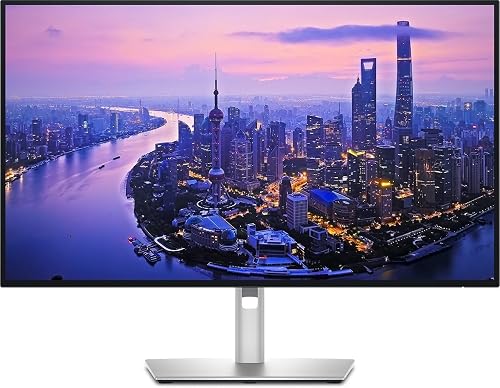
The Dell UltraSharp 27 4K Thunderbolt Hub Monitor (U2725QE) is built for one job: to be the center of a laptop-based desk. It combines a 27-inch 4K IPS Black panel, a 120 Hz refresh rate and a full Thunderbolt 4 hub with Ethernet and a KVM switch. We rank it second in our lineup, behind the simpler Dell S2725QC, because its extra capability costs noticeably more and many people will not use it. We do not test monitors ourselves; the figures below come from Dell’s published specification page, and we flag anything the page did not state.
What This Monitor Is
The U2725QE sits in Dell’s UltraSharp line, the company’s professional range, and it is a different product from the older U2723QE and U2724D. Dell calls it a “Thunderbolt Hub” monitor, which tells you the priority: the screen is very good, but the connections are the reason to buy. The Amazon listing mentions HDMI 2.1, USB-C, USB-A and Ethernet ports, which matches Dell’s list.
Display: IPS Black, Wide Gamut and 120 Hz
Dell lists a flat 27-inch IPS Black panel at 3840 x 2160 (163 pixels per inch) with an anti-glare, anti-reflective coating. IPS Black is Dell’s name for an IPS variant with a deeper black level, and Dell lists a 3,000:1 native contrast ratio. A typical IPS monitor, including the S2725QC at 1,500:1, is lower.
The color numbers are where this monitor pulls away from mainstream models. According to Dell, the U2725QE covers 100% of sRGB and BT.709 and 99% of DCI-P3 and Display P3. Dell lists a factory calibration accuracy of Delta E below 1.5 on average. Those figures matter for photo editing, design and video work, and for Mac users who care about the P3 color space that Apple screens use.
Brightness is listed at 450 cd/m2 typical and 600 cd/m2 peak, with VESA DisplayHDR 600 certification. That is a real step up from the 350 cd/m2 on the mainstream Dell. The refresh rate is 120 Hz, with a 5 ms gray-to-gray fast mode and 8 ms in normal mode. Dell also lists ComfortView Plus, flicker-free operation and an ambient light sensor, and the monitor supports picture-by-picture and picture-in-picture modes for viewing two sources at once.
Connectivity: The Real Reason to Buy
Dell’s spec page lists:
- Thunderbolt 4 upstream: DisplayPort 1.4 with DSC and up to 140W power delivery (EPR)
- Thunderbolt 4 downstream: daisy-chain output, 15W
- HDMI 2.1: one port, up to 4K at 120 Hz
- DisplayPort 1.4: two ports, one input and one output
- USB-C upstream: 10Gbps, for the KVM switch
- USB-C downstream: two 10Gbps ports
- USB-A: four 10Gbps ports, plus one more USB-A port with Battery Charging 1.2
- RJ-45: 2.5 GbE Ethernet
- Audio: 3.5 mm line out
For a person with a laptop, that list replaces a dock. Connect one Thunderbolt 4 cable and the laptop receives power, video, wired Ethernet and every USB device on the desk. At up to 140W, even larger laptops that charge over USB-C can run from the monitor alone, provided the laptop supports that level of USB Power Delivery. Check your laptop’s charger wattage and its USB-C specification.
The KVM switch is useful for hybrid workers. Plug in a work laptop and a personal computer, share one keyboard and mouse, and switch with a button. The 2.5GbE Ethernet port is faster than the standard gigabit port found on most docks, though you need a router and wiring that support it to benefit. Dell lists a Thunderbolt 4 downstream port for daisy-chaining a second display, but how many displays your laptop can drive depends on its graphics hardware and operating system. Apple’s tech specs for your MacBook list the number of external displays it supports.
Stand, Mounting and Build
Dell lists up to about 5.9 inches (150 mm) of height adjustment, tilt from -5 to 21 degrees, swivel of 45 degrees in each direction and a 90-degree pivot. The panel supports VESA 100 x 100 mm mounting. Without the stand the monitor weighs about 11.5 lb (5.22 kg), and about 15.6 lb (7.06 kg) with it. The finish is black. The ergonomics are generous and are a step ahead of the S2725QC’s 5.1-inch height range.
Dell’s spec page lists Energy Star and TCO Certified (Edge) credentials, and TAA compliance, which matters to some government and corporate buyers.
What Is Missing
Dell’s spec list shows no built-in speakers and no webcam. Dell sells an optional soundbar. If you want speakers in the panel, the mainstream Dell S2725QC has two 5W speakers. The fast response mode is 5 ms, so this monitor is not the best choice for fast competitive play. It is also priced as a premium monitor, so if you only need a bigger screen and one-cable charging at 65W, the cheaper Dell covers that.
Who Should Buy the Dell U2725QE
- Hybrid workers who move between a work laptop and a personal computer and want a KVM switch.
- Laptop users with a high-wattage charger, where 140W of power delivery means the laptop charger can stay in the bag.
- Photographers, designers and video editors who benefit from 99% DCI-P3 and a calibrated factory setup. For critical work, still calibrate with a colorimeter.
- Anyone who wants wired Ethernet and many USB ports without buying a separate dock.
- IT-managed offices, where TAA, Energy Star and TCO credentials and a 3-year Advanced Exchange warranty (per Dell’s UK page) are on the checklist.
Who Should Look Elsewhere
- Buyers who only need a big, sharp screen. The mainstream pick offers 4K at 120 Hz and 65W charging for less.
- People who want speakers in the monitor. Dell lists none.
- Mac owners who want Mac-specific features such as keyboard brightness control. The BenQ MA270U is built around that idea.
- Serious gamers. Pick a faster, lower-response panel.
What to Check on the Amazon Listing
- Model number. The title should say U2725QE. Do not confuse it with the U2724D or U2723QE.
- Seller and warranty. This monitor is sometimes sold by third-party sellers. Check the seller name and whether Dell’s 3-year warranty applies to the unit.
- Return policy. Monitors this size are best returned unopened if there is an issue.
- Your laptop’s ports. You need Thunderbolt or USB-C with DisplayPort Alt Mode for the one-cable setup. Check your laptop’s spec page.
- Customer reviews. Look for comments about your laptop’s brand and any docking quirks.
Our Take
The U2725QE is a monitor for people who live at their desk. Wide color, 600 cd/m2 peak brightness, 140W power delivery, a KVM switch, Ethernet and a full stand make it a very complete workstation display. It does not try to be a gaming monitor or a media center. If you need what it offers, it can replace a separate dock and make a messy desk simple. If you do not, our number one pick covers most people for less. See how it ranks in our best monitors of 2026 comparison.
See price on Amazon
Sources