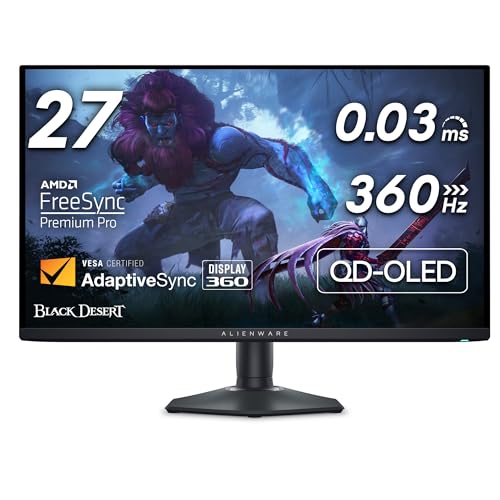
Competitive PC gamers tend to want three things from a monitor: a high refresh rate, a fast panel and deep contrast. The Alienware AW2725DF is the model we picked for shoppers who want all three in a 27-inch package. It combines a QD-OLED panel with 1440p resolution and a refresh rate of up to 360Hz, and it sits in the premium tier of our monitor lineup. We do not test products or take our own measurements. The specifications below come from the Dell and Notebookcheck pages we opened, and we say so when something is not stated or when we could not confirm it.
Which Alienware AW2725DF Is This?
The Amazon listing is the Alienware AW2725DF, described as a 26.7-inch viewable QD-OLED monitor with a 2560x1440 (QHD) resolution and a 360Hz refresh rate. The model code matters. The AW2725D is a different monitor with a lower refresh rate, and the AW2725Q is a 4K model. Dell’s configuration page lets you choose between refresh rates and sync options, so check that the listing says AW2725DF and 360Hz. The monitor was announced in early 2024 and remains a current option for 1440p OLED at very high refresh rates.
Display: QD-OLED at 1440p
Dell’s product page lists a 27-inch class flat QD-OLED panel with QHD (2560 x 1440) resolution and a 360Hz refresh rate. The adaptive sync option for this version is AMD FreeSync Premium Pro with VESA adaptive sync, and the description lists VESA DisplayHDR True Black 400. The Amazon title adds a 0.03 ms gray-to-gray response time. Response times of that kind are typical of OLED panels, which switch pixels very quickly.
Notebookcheck’s announcement coverage adds two details. It says the panel outputs 1440p at 360Hz only when connected over DisplayPort, and that over HDMI it is limited to 1440p at 144Hz. It also cites a 1,000-nit peak brightness figure and confirms the DisplayHDR True Black 400 certification.
Peak brightness on OLED is normally reached on small portions of the screen, with lower levels when much of the image is bright. For that reason, HDR is at its best in a dim or dark room, and a sunny desk is not this monitor’s natural habitat. The Dell pages we opened did not give a typical SDR brightness figure, so we are not quoting one.
A 27-inch 1440p panel has a moderate pixel density. That suits very high frame rates well, because a 1440p image is far easier for a graphics card to drive than 4K. If you want more resolution at a lower refresh rate, a different monitor in our lineup makes more sense.
What 360Hz Actually Asks of Your PC
A 360Hz screen only pays off if your computer can produce frames that fast. In many esports titles at lower graphics settings, a modern gaming PC can get close; in demanding single-player games at high settings, it usually cannot, and a 144Hz or 240Hz screen would look much the same. Adaptive sync (FreeSync Premium Pro here) helps smooth out frame-rate dips below the maximum. Before you choose this monitor, think about the games you play and the frame rates your graphics card delivers in them, not just the number on the box.
You also need the right connection. Since DisplayPort is the route to 360Hz according to Notebookcheck, make sure your graphics card has a DisplayPort output and that you use a good cable, preferably the one that came in the box.
Ports and Connectivity: What We Can and Cannot Say
The Amazon listing title mentions HDMI, DP and USB 3.2 Gen1 connections and a stand with height, tilt, swivel and pivot adjustability. The Dell pages we could open did not include a full port list or a stand specification table, so we are deliberately not stating port counts, version numbers beyond what is cited above, or VESA mount details. Dell publishes a specification sheet and a user’s guide for the AW2725DF, and you should check them before buying if any of these points matter to you:
- DisplayPort inputs. How many there are and which version.
- HDMI. Our sources say 1440p at 144Hz maximum, which matters if you plan to use a console.
- USB. Whether the monitor has a USB hub for peripherals and a USB-C video input if you want to dock a laptop.
- Speakers. Whether any are built in. If you rely on monitor audio, confirm it before ordering.
- Mounting. The VESA pattern, if you use a monitor arm.
For a one-cable laptop setup, our Dell 27 Plus 4K USB-C profile describes a monitor built for that role.
Text Clarity and Screen Finish: Check During Your Return Window
OLED panels can differ from conventional LCD panels in how their sub-pixels are arranged, and some people notice small text looking slightly different on them. We have no source for how this specific model renders text, so we make no claim either way. If you read and write all day, spend your first days with the monitor checking how a document, a web page and code look at your normal viewing distance, and use the return window if it bothers you. Do the same for glare: the screen finish and your room lighting matter more than any spec sheet.
Burn-In and Warranty
OLED panels can suffer from image retention or burn-in if the same static elements stay on screen for long periods, such as a taskbar or a game HUD. Manufacturers differ in how they handle it. We could not confirm Dell’s coverage terms on the pages we read, so we will not quote them. Before buying, read Dell’s warranty page for this model and make sure the seller on Amazon passes on the manufacturer’s coverage. A few habits help any OLED screen: use a dark theme, set the taskbar to auto-hide, and let the monitor run any built-in pixel-refresh routines it offers.
Who Should Buy the Alienware AW2725DF
- PC gamers who play competitive shooters and want very high frame rates at 1440p, with a graphics card that can drive them.
- Gamers who want deep blacks and strong contrast in dark scenes, in an OLED panel of moderate size.
- Desktop users with a DisplayPort-equipped graphics card, since that is the route to 360Hz.
- People with a dimmer room, where OLED contrast looks its best.
Who Should Look Elsewhere
- Console-first players. HDMI is limited to 1440p at 144Hz according to Notebookcheck, which does not play to the monitor’s strengths.
- People who want a laptop dock. The Dell pages we opened did not confirm a USB-C video input, so look at a monitor built for one-cable use.
- Shoppers on a tighter budget. This is a premium monitor. For a lower-cost 1440p gaming display, look at the Samsung Odyssey G5 G50D profile.
- Shoppers weighing OLED rivals. The LG UltraGear OLED 27GX790A-B profile covers another 27-inch 1440p OLED aimed at fast PC gaming, with a different panel type and port set, so compare the two before you decide.
- Anyone who works with static documents for most of the day and does not want to think about OLED care.
What to Check on the Amazon Listing
- Model and refresh rate. The listing should say AW2725DF and 360Hz, not AW2725D or AW2725Q.
- Seller and warranty. Confirm that the seller is Dell or an authorized reseller and ask about OLED burn-in coverage in writing.
- Your GPU and cables. To reach 360Hz you need a graphics card with a DisplayPort output that can carry it, and a good cable.
- Return window. Run the monitor for a few days with your usual games and desktop to see if the text, brightness and glare suit you.
Because we do not list prices on this site, use the button below to see the current price on Amazon.
Bottom Line
The Alienware AW2725DF is a specialist’s monitor. It gives desktop gamers a QD-OLED panel with 1440p resolution, up to 360Hz over DisplayPort, FreeSync Premium Pro and DisplayHDR True Black 400. It asks you to accept a 144Hz cap over HDMI and the usual OLED care, and several details that matter to some buyers, such as ports, stand and warranty, should be confirmed on Dell’s own spec sheet. For a high-end gaming PC in a dim room, it is a strong fit. For work, laptops or consoles, other monitors in our lineup make more sense. See how it ranks in our best monitors of 2026 comparison.
See price on Amazon
Sources