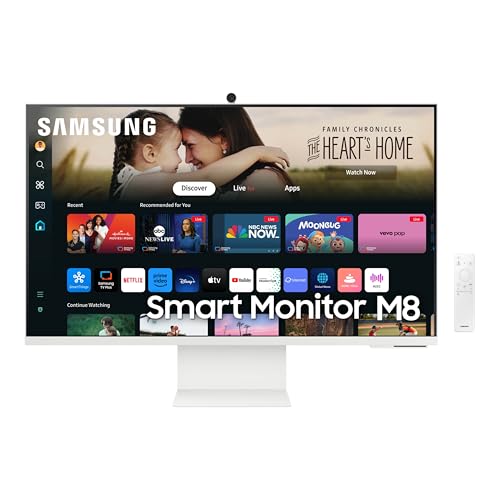
Some people do not want a monitor, a streaming box, a webcam and a pair of speakers. They want one screen that does all of it. The Samsung Smart Monitor M8 (M80D) is the model we picked for that job. It is a 32-inch 4K display with built-in streaming apps, speakers, a camera and a USB-C port, and it sits in the premium tier of our monitor lineup because of everything packed into it. We do not test products or take our own measurements, so every figure below comes from Samsung’s published specification page, and we say so when Samsung does not state something.
Which Samsung M8 Is This?
The Amazon listing is the 32-inch Samsung M8 (M80D) Series, model LS32DM801UNXZA, a 2024 model. Samsung sells close relatives, including the M80F, the M7 and other sizes, and their specs differ. We read Samsung’s own specification page for the LS32DM801UNXZA, and that page is the source for the numbers here. The Samsung page for this model that we read is its Canadian site, which lists the same model number as the US listing. The Samsung US page we found showed a different model number (an M80F-series code), so verify the model number on the Amazon listing yourself before buying.
Display: Large, Sharp and Colorful, but 60Hz
Samsung lists a 32-inch VA panel with 4K resolution (3,840 x 2,160), a maximum refresh rate of 60Hz and a response time of 4 ms (gray to gray). Other numbers from Samsung:
- Brightness: 400 cd/m2 typical and 300 cd/m2 minimum.
- Contrast: 3,000:1 static. VA panels are known for deeper blacks than IPS panels, which helps with movies and dark scenes in streaming shows.
- Color: 99% sRGB coverage (CIE1931).
- HDR: HDR10, with HDR10+ listed as certified. On a monitor in this class, HDR gives some extra punch to compatible content but is not the same as a true high-brightness HDR TV.
At 32 inches and 4K, the pixel density is roughly 138 pixels per inch, which makes text sharp while giving you a big canvas. That size works especially well for sitting a couple of feet away at a desk, and it also works for watching video from a short couch distance in a dorm or studio.
The 60Hz limit is worth thinking about. For streaming, office work, browsing and most casual games, 60Hz is fine. It is not what you want for fast shooters or high-frame-rate console modes, and Samsung lists no adaptive-sync feature on the page we opened.
Smart Features: Streaming, Remote, Camera and Gaming Hub
This is what separates the M8 from an ordinary monitor. Samsung lists Tizen as the operating system, a remote controller, Gaming Hub, built-in Wi-Fi (Wi-Fi 5) and Bluetooth 5.2. Samsung’s page highlights smart TV apps. In practice that means you can turn the monitor on, connect to your home network and open a streaming app, without a PC or a separate streaming stick.
- Streaming and apps: The remote and the Tizen interface work much like a Samsung TV. App availability depends on Samsung’s app store.
- Gaming Hub: A launcher for cloud gaming services and game-related apps. Subscription requirements are set by the services themselves.
- Camera: Samsung lists a camera as included, and the Amazon title calls it a SlimFit Camera. It is useful for video calls, but check the listing for details on how it attaches.
- Speakers: Samsung lists a 10 W speaker output with Adaptive Sound Pro. That is louder than the small 2 x 5 W speakers you find on typical budget monitors, and it is enough for video calls and casual streaming. It does not replace a proper audio system.
One more consideration: smart features mean menus, account sign-ins and software updates. If you want a monitor that only shows what your computer sends, a standard monitor will be simpler.
Ports and Connectivity
Samsung’s list shows one USB-C port with 65 W charging power, one HDMI port (version 2.0) and two USB ports (the USB hub version is 2.0). That is a short list, and it sets the shape of how you can use the monitor:
- A laptop over USB-C: One cable can handle video and 65 W charging. That is enough for many ultrabooks and MacBook Air models, but check the wattage on your laptop’s original charger. If your laptop ships with a 96 W or 140 W adapter, it may charge slowly under heavy load.
- A PC or a console over HDMI: One HDMI 2.0 input means one device. HDMI 2.0 does not carry 4K at 120Hz, and the monitor tops out at 60Hz anyway.
- USB devices: Two USB 2.0-speed ports are fine for a keyboard dongle or a mouse receiver, not for fast external storage.
If you want a 4K monitor with more flexible connections, our Dell 27 Plus 4K USB-C profile lists a smaller 27-inch screen with USB-C power delivery and two HDMI inputs.
The Stand and Mounting
Samsung lists a height-adjustable stand, tilt from about -2 to 15 degrees and a pivot range of about -92 to 92 degrees. The page lists a 100 x 100 VESA wall-mount pattern. The set weighs about 15.9 lb (7.2 kg) with the stand and about 9.3 lb (4.2 kg) without it, according to Samsung. The M8 is a little deep and tall for a small desk, so measure your space. Samsung does not list swivel separately on the page we read, so we are not claiming it.
Wi-Fi, a remote and a camera mean the M8 is a monitor you may want to keep near a power outlet and your router. It does not run on batteries.
Who Should Buy the Samsung M8
- Dorm and studio-apartment residents who want one screen for classes, video calls and streaming.
- Home-office workers who also stream during breaks and do not want a separate TV.
- Laptop owners with a thin laptop that charges at 65 W or less and who like one-cable docking.
- Families in a shared space where a remote and a streaming interface make the screen easier for everyone to use.
- Anyone who dislikes cable clutter, since camera, speakers and apps are all included.
Who Should Look Elsewhere
- Competitive gamers. The 60Hz ceiling is not made for fast action. See our Dell 27 Plus 4K USB-C profile for a 120Hz 4K alternative, or the gaming picks in our ranking.
- Anyone who needs several video inputs. One HDMI port is limiting.
- Mac users who want the sharpest text at a smaller size. A 27-inch 4K screen has a higher pixel density than a 32-inch one.
- People who want a plain monitor. Smart-TV software is optional in spirit but present in practice.
- Budget shoppers. The M8 packs in extras and sits at the premium end of our list.
What to Check on the Amazon Listing
- Model number. It should read M80D and LS32DM801UNXZA. The M80F and M7 are different monitors.
- Seller and warranty. Listings for this model can come from Samsung or from third-party sellers, and renewed units are sold under separate listings. Check who the seller is, whether the unit is new or renewed, and what warranty applies. Samsung’s page we opened did not state the warranty term.
- Color. The listing describes a white M8. If you want a black monitor, this is not the one.
- Return window. Try the smart features, camera and USB-C charging early so you know whether they work for your setup.
Because we do not list prices on this site, use the button below to see the current price on Amazon.
Bottom Line
The Samsung Smart Monitor M8 (M80D) is an all-in-one screen. You get a 32-inch 4K VA display with 99% sRGB coverage and HDR10+, a built-in smart-TV system, speakers, a camera, USB-C charging at 65 W and a height-adjustable stand. You give up high refresh rate and a rich selection of ports. For a dorm, a studio apartment or a home office where one screen has to do several jobs, it is a strong candidate. For gaming at high frame rates or a multi-device desk, choose another model.
See price on Amazon
Looking for a more traditional desk monitor? Our Dell S2725HS profile covers a simple 27-inch budget option. To see where the M8 lands among all nine monitors, read our best monitors of 2026 comparison.
Sources