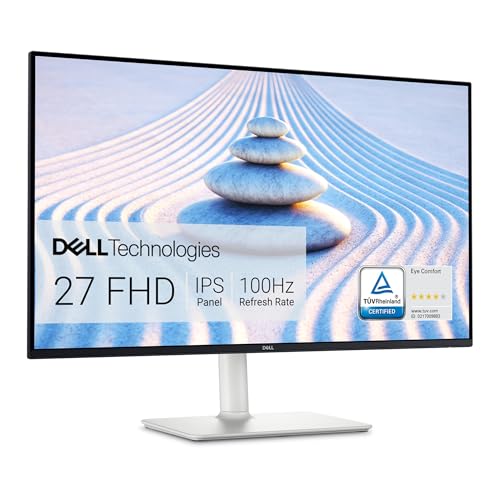
Not every desk needs a 4K display or a dock. Sometimes you want a clean, bright 27-inch screen for email, documents, video calls and a streaming window, and you do not want to think much about it. The Dell S2725HS is the model we picked for that role. It is the budget pick in our monitor lineup, and this profile explains what that means in practice. We do not test products or run our own measurements, so every figure below comes from Dell’s published specification list, and we say so when Dell does not state something.
Which Dell S2725HS Is This?
The Amazon listing is the Dell 27 Monitor S2725HS in Ash White, a 27-inch Full HD display. The name is easy to mix up with its siblings. The S2725H uses a different stand, and the S2725DS has a higher-resolution panel, so the figures below do not apply to either of them. The one on this page has a 1920x1080 IPS panel, 100Hz refresh rate and a stand that raises, tilts, swivels and rotates. When you check the listing, confirm that the model number reads S2725HS before you order.
One practical note: when we read Dell’s own product page, it showed the monitor as temporarily out of stock on Dell’s store. That can change from week to week, and it is a good reason to look at the Amazon listing and the seller carefully.
Display: What 1080p on 27 Inches Looks Like
Dell lists an IPS panel with a 27-inch diagonal, a 16:9 shape and a resolution of 1920x1080. The pixel pitch is 0.3114 mm, which Dell translates into 82 pixels per inch. For comparison, the 4K monitors in this lineup land at roughly twice that pixel density. In everyday terms, that means photos and video look perfectly good, but text edges are a little softer, and you will see the pixel grid if you sit close.
Other display numbers on Dell’s page:
- Refresh rate: 100Hz. That is a gentle step up from the 60Hz you find on many office monitors, and scrolling and cursor movement feel a bit smoother.
- Brightness and contrast: 300 cd/m2 typical and a 1500:1 typical contrast ratio. Brightness is adequate for a normal office or bedroom, though not generous for a sun-drenched room.
- Color: 99% sRGB coverage (typical), 16.7 million colors, and 178-degree viewing angles in both directions. sRGB coverage is the number that matters for web and everyday content; it is not a wide-gamut or professional color-work panel.
- Response time: Dell lists 8 ms in Normal mode, 5 ms in Fast mode and 4 ms in Extreme mode. Faster modes can introduce visible artifacts on some monitors, so most people will be happy leaving it on the default.
- Coating: Antiglare with a 3H hard coating, which helps with window and lamp reflections.
Dell also lists TÜV Rheinland Eye Comfort 4 Star certification and flicker-free operation. The page does not list FreeSync, G-Sync or any adaptive sync for this model, so do not buy it expecting variable refresh rate for gaming.
Ports: Two HDMI and That Is It
Connectivity is where this monitor shows its budget roots. Dell’s list shows two HDMI inputs, and the page notes that the HDMI inputs deliver 1920x1080 at 100Hz as specified for HDMI 1.4. There is no DisplayPort, no USB-C and no USB hub on the list. A security-lock slot is included. In the box, Dell lists one power cable and one HDMI cable.
What does that mean for you?
- Desktop PC: Fine, as long as your graphics card has an HDMI output, which nearly all do.
- Laptop: Fine if your laptop has an HDMI port. If it has only USB-C or Thunderbolt ports, you need a USB-C to HDMI cable or a small adapter. You will also charge the laptop separately, since this monitor offers no power delivery. If you want one cable for video and charging, see the Dell 27 Plus 4K USB-C profile instead.
- Game console or streaming stick: Works at 1080p. Do not expect 1440p or 4K modes.
- Two sources: Having two HDMI inputs lets you switch between, say, a work laptop and a personal desktop using the on-screen menu.
Speakers and Eye Comfort
The S2725HS has integrated 2x5W speakers. Built-in monitor speakers are rarely impressive, and these are no exception on paper, but they are handy for video calls, YouTube and alert sounds, and they save you the cost and desk space of a pair of external speakers. If you care about music, a small desktop speaker or headphones is still a better answer.
Dell’s TÜV Eye Comfort 4 Star and flicker-free listings are certifications about display behavior, not claims about your health, so treat them as a sign the panel was designed with long desk sessions in mind rather than as a guarantee of anything.
The Stand: The Quiet Highlight
This is the feature that sets the S2725HS apart from many monitors in its class. Dell lists:
- Height: 5.1 inches (130 mm) of adjustment
- Tilt: -5 to +21 degrees
- Swivel: -30 to +30 degrees
- Pivot: -90 to +90 degrees, so you can rotate the screen into portrait mode for long documents or code
- VESA: 100 mm mounting pattern for wall mounts and monitor arms
Dell lists the height with the stand as 15.26 to 20.38 inches, the width as 24.00 inches and the depth as 7.89 inches. Without the stand, the panel is 13.95 inches tall and 2.32 inches deep. The weight of the panel alone is 9.48 lb. In total, this is a monitor that fits on a modest desk and can be tuned to your seating position, which is not something you can say about every budget model.
Power and Certifications
Dell lists power consumption of 17.0 W in On mode, with 0.4 W in Standby and 0.3 W when off, and describes the monitor as an ENERGY STAR certified monitor. For a home office that runs for many hours a day, a low draw is a small but welcome saving.
Who Should Buy the Dell S2725HS
- Home-office workers and students who want a bigger screen than a laptop display for documents, email, spreadsheets and video calls.
- Budget shoppers looking for a 27-inch IPS panel with a flexible stand.
- Anyone who wants a second monitor for a side-by-side desk setup, especially in portrait mode.
- Families sharing a desk computer, where different people need different heights and angles.
- People who watch video and want built-in speakers without extra gear.
Who Should Look Elsewhere
- Laptop users who want one cable. Without USB-C or power delivery, you will need a separate charger. The ASUS ZenScreen MB16AHG profile covers a portable option that connects over USB-C if a second, smaller screen suits you better.
- Anyone who reads or edits text all day. 82 pixels per inch is soft for small type; a 1440p or 4K monitor will look noticeably crisper.
- Gamers who want variable refresh rate or 120Hz and above. Dell lists none of those for this model.
- Photographers or designers who need wide color gamut such as DCI-P3. Dell lists sRGB coverage only.
- Mac users who want sharp text. macOS looks best on high-density screens, and 1080p at 27 inches is not one of them.
What to Check on the Amazon Listing
- Model number. It should read S2725HS. The S2725H has a different stand and the S2725DS has a different resolution.
- Seller and warranty. Dell lists a 1-year Advanced Exchange Service and Premium Panel Exchange. Check that the seller is Dell or an authorized reseller and that the warranty applies to the unit you receive.
- Color. The listing is Ash White. If you want a black monitor, this is not the right listing.
- Return window. Look over the screen soon after unboxing for stuck pixels or uneven backlighting, and keep the box until you are sure.
Because we do not list prices on this site, use the button below to see the current price on Amazon.
Bottom Line
The Dell S2725HS does a modest job well. It offers a 27-inch IPS screen with 99% sRGB coverage, a 100Hz refresh rate, two HDMI inputs, built-in speakers, an ENERGY STAR listing and a stand with height, tilt, swivel and pivot adjustment. What it lacks is equally clear: no USB-C, no DisplayPort, no adaptive sync, and a resolution that is only 1080p on a large panel. If those limits do not bother you, it is an easy, low-fuss choice for a home office or a second desk. If they do, step up to a USB-C or higher-resolution model. See how it ranks in our best monitors of 2026 comparison.
See price on Amazon
Sources