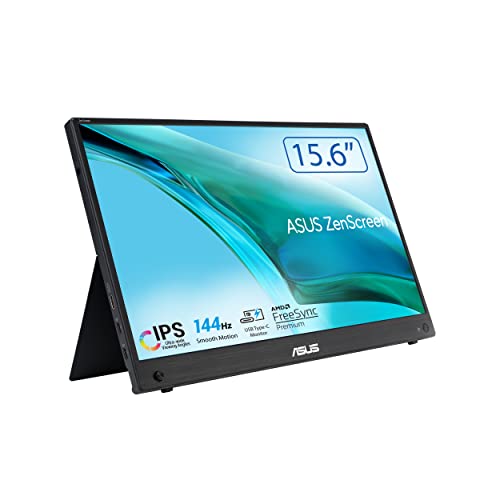
A second screen is one of the cheapest ways to get more done on a laptop. It is also one of the easiest things to leave at home, because most monitors are not made to be carried. The ASUS ZenScreen MB16AHG is the model we picked to cover that role. It is a 15.6-inch portable monitor that stays on the lighter end of our monitor lineup, and it aims at travelers, students, hybrid workers and anyone who wants a second display without a permanent desk setup. We do not test products or take our own measurements, so every figure below comes from ASUS’s published specification page, and we say so when ASUS does not state something.
Which ASUS ZenScreen Is This?
ASUS sells several ZenScreen portable monitors, and the names are close. The MB16AHG is the 15.6-inch, 1920x1080 model with a 144Hz refresh rate. It is not the MB16QHG, which has a 16-inch screen at a higher resolution, and it is not the MB16AHV. The model code on the Amazon listing should read MB16AHG. If it reads something else, the specs below do not apply.
Display: Small, Smooth and Colorful Enough
ASUS lists a 15.6-inch panel with 1920x1080 resolution, a 16:9 shape and an IPS panel with an anti-glare surface. At this size, 1080p is a comfortable match: the pixel pitch is 0.179 mm, so text looks reasonably sharp for a screen sitting a couple of feet away. Other numbers from ASUS:
- Refresh rate: 144Hz maximum, plus AMD FreeSync Premium certification and Adaptive-Sync support. That is a real bonus on a portable screen, since most competing travel monitors stop at 60Hz.
- Response time: 3 ms (gray to gray).
- Brightness: 300 cd/m2 typical. That is fine indoors, but it will look dim in direct sunlight at a window seat or on a patio.
- Contrast: 1200:1 typical.
- Color: 100% sRGB and 16.7 million colors, with 178-degree viewing angles in both directions.
- Eye care: Flicker-free and TÜV Low Blue Light certified, according to ASUS. These are display certifications, not health claims.
The panel is a good fit for documents, browsers, chat windows, video calls, spreadsheets and video. It is not a tool for color-critical work, where you would want a wide-gamut screen, and it does not claim HDR.
Ports and Power
ASUS lists two USB-C ports that support DisplayPort Alt Mode, one mini HDMI port and an earphone jack. In the box, ASUS lists a USB-C cable, a USB Type-C to A adapter, a mini HDMI to HDMI cable, a power adapter, a sleeve, a quick start guide and a warranty card.
Here is how that plays out with different devices:
- Laptops with USB-C video output. Plug in the USB-C cable and the screen should appear as a second display. Whether your laptop port supports video output varies by model, so check your laptop maker’s specifications.
- Laptops with only HDMI. Use the mini HDMI to HDMI cable. You will need the power adapter plugged in, since HDMI does not carry power.
- Phones, tablets and handheld PCs. Devices that output video over USB-C may work. Look at your device’s support page for the details.
- Game consoles. A console with HDMI out can use the mini HDMI input, though you will want headphones because the monitor has no speakers.
Two USB-C ports give you flexibility in how you cable it, and ASUS lists a maximum power consumption of 17W. What ASUS does not state on its spec page is whether the monitor runs on a single USB-C cable without the adapter. We do not want to guess, so treat the power question as open: try it with your own laptop, and keep the adapter in the bag.
Size, Weight and Stand
ASUS lists dimensions without the stand of 14.17 x 8.93 x 0.47 inches (35.99 x 22.68 x 1.20 cm) and a net weight of 2.03 lb (0.92 kg). In everyday terms, that is about as heavy as a pair of paperback books and thinner than most phone-and-case combinations. The shipping weight with packaging is 6.13 lb (2.78 kg).
For positioning, ASUS lists tilt from +15 to +35 degrees, no height adjustment and a 1/4-inch tripod socket. The Amazon listing title describes an Ergo Kickstand. ASUS does not list a VESA mounting pattern, so do not plan on putting this on a standard monitor arm. If you often use it on a hotel desk or a kitchen table, a small laptop riser or a stack of books is the usual way to bring the screen up to eye level.
The monitor has no built-in speakers, according to ASUS. That keeps the case slim but means you will need headphones, laptop audio or a small external speaker.
Who Should Buy the ASUS ZenScreen MB16AHG
- Hybrid workers and travelers who want a second screen in a hotel room, coworking space or airport lounge.
- Students with a small dorm or library desk who want to keep a lecture video or notes on one screen and a document on the other.
- Remote workers on a laptop who do not have room for a full-size monitor.
- Gamers on the go who want a 144Hz screen for a handheld PC or a compatible laptop.
- People who just want a light second display for chat, email and reference material.
Who Should Look Elsewhere
- Anyone who wants a primary display. At 15.6 inches and 1080p, it is a supporting screen. For a main desk monitor, our Dell S2725HS profile covers a 27-inch budget model with a fully adjustable stand.
- People who want built-in speakers. ASUS lists none.
- Anyone who needs bright, outdoor-readable color. 300 cd/m2 is typical for the class but not bright.
- Users who want a height-adjustable stand or VESA mount. ASUS lists neither.
- Readers who need 4K or high resolution. For a sharper desktop screen with USB-C docking, take a look at the Dell 27 Plus 4K USB-C profile.
Practical Tips Before You Buy
- Check your laptop’s USB-C port. Some USB-C ports charge only and do not output video. Look for a DisplayPort or Thunderbolt logo, or read the laptop maker’s spec page.
- Plan for power. Keep the included adapter handy, especially for HDMI use, and be ready for the screen to dim when running from a weak USB-C port.
- Set the refresh rate yourself. On Windows, open Settings, System, Display, Advanced display and pick 144Hz. On a Mac, look under System Settings, Displays for a refresh rate option. A laptop or cable that cannot carry 144Hz will fall back to a lower rate.
- Check the seller and warranty. ASUS’s spec page lists a warranty card in the box but does not state a warranty length. Confirm the term with the seller before buying.
- Protect it. A portable screen is thin. Use the included sleeve and avoid stacking heavy items on it.
Because we do not list prices on this site, use the button below to see the current price on Amazon.
Bottom Line
The ASUS ZenScreen MB16AHG is a well-judged portable monitor. You get a 144Hz IPS panel with FreeSync Premium, 100% sRGB coverage, two USB-C ports with DisplayPort Alt Mode, a mini HDMI input and a body that weighs about 2 lb. You give up speakers, a height-adjustable stand and a VESA mount, and the 300 cd/m2 brightness and 1080p resolution keep it in supporting-screen territory. For a laptop user who wants more screen space on the road, it is an easy fit. For a main desk monitor, look at a full-size model. See how it ranks in our best monitors of 2026 comparison.
See price on Amazon
Sources